CTDiscord

CTDiscord Documentation

Complete guide for integrating your Minecraft server with Discord

Installation

Steps to install, activate, and configure the CTDiscord plugin

Requirements for Bukkit

  • Minecraft Server 1.16.5+ (For better performance)
  • Java 17+
  • Discord Server
  • Discord bot with administrator privilege

Requirements for Velocity

  • Velocity 3.4.0
  • Java 17+
  • Discord Server
  • Discord bot with administrator privilege

Installation Steps

  1. Download the plugin from your client area
  2. Place the .jar file in your server's plugins folder
  3. Restart your server for load configuration
  4. After restarting the server, stop your server completely and apply the initial settings in the config.yml file.
  5. Start your server again
Important: The license code and Discord bot token must be entered in the initial stages, otherwise the plugin will be permanently disabled. Also, your Discord bot settings in the Discord developer portal must be done correctly to avoid problems.
config.yml

#  ██████╗████████╗██████╗ ██╗███████╗ ██████╗ ██████╗ ██████╗ ██████╗
#  ██╔════╝╚══██╔══╝██╔══██╗██║██╔════╝██╔════╝██╔═══██╗██╔══██╗██╔══██╗
#  ██║        ██║   ██║  ██║██║███████╗██║     ██║   ██║██████╔╝██║  ██║
#  ██║        ██║   ██║  ██║██║╚════██║██║     ██║   ██║██╔══██╗██║  ██║
#  ╚██████╗   ██║   ██████╔╝██║███████║╚██████╗╚██████╔╝██║  ██║██████╔╝
#  ╚═════╝   ╚═╝   ╚═════╝ ╚═╝╚══════╝ ╚═════╝ ╚═════╝ ╚═╝  ╚═╝╚═════╝
#                  CTDiscord - Version 1.0 - _30Block_
#          You are now editing config.yml file please becareful
#
# 📝 Plugin Document » https://ctdiscord.craft-tech.xyz/documents
# ❓ Plugin Placeholders » https://ctdiscord.craft-tech.xyz/documents#placeholders
# 🔥 You bought plugin from https://ctdiscord.craft-tech.xyz :) thankyou for supporting us.

# Main plugin configuration
license_key: "LICENSE_KEY"

# Bot configuration
discord_bot_token: "DISCORD_BOT_TOKEN"
client-id: "BOT_CLIENT_ID"
server-id: "GUILD_ID"
log-channel: "0" # If you set this to 0, it means that this feature, is disabled.
cmd-prefix: "!" # Second bot command executor
bot-status:
  activity: "😎 crafttech studios | %ctdiscord_uptime%" # you can use any other placeholders
  status: online # online, dnd, idle, offline
  mode: watching # watching, playing, competing
  refresh-rate: 10 # In seconds => (5-30), NOTE: If you want your account get deleted in a few seconds, set this to 1! 🙂

# Tracker system
tracker:
  channel: "0" # If you'd like, you can enable this feature! This feature allows you to change the channel ID to where ever you want to receive the Tracker Messages
  embed: "tracker" # Your tracker embed in the embeds.json

# Account Link system
linkaccount:
  enable-rewards: false
  rewards:
#    - eco give %ctdiscord_playername% 6000 # This command need economy plugin like Economy +
    - give %ctdiscord_playername% diamond 1

# Playtime System
playtime-enabled:
  enabled: true
  embed: "playtime"
Configuration

Essential Settings

Setting Description Required
license_key Your Purchased license key Yes
discord_bot_token Your discord bot token Yes
client-id Client id for better command register Yes
server-id Your guild ID Yes

Dependency's

Plugin Description Required
PlaceholderAPI For use any placeholder in discord Optional
Luckperms/PermissionEX For your permission system Optional

Permissions

Member Permissions

Permission Description Required For ?
ctdiscord.link Allows user's to link minecraft account to discord account /linkaccount

Admin Permissions

Permission Description Required For ?
ctdiscord.admin Set full access to rank for all commands /ctd reload - /ctd online - /ctd offline
ctdiscord.reload Allows user to reload plugin configuration /ctd reload
ctdiscord.online Allows user to force online bot from game /ctd online
ctdiscord.offline Allows user to force offline bot from game /ctd offline

Log channel

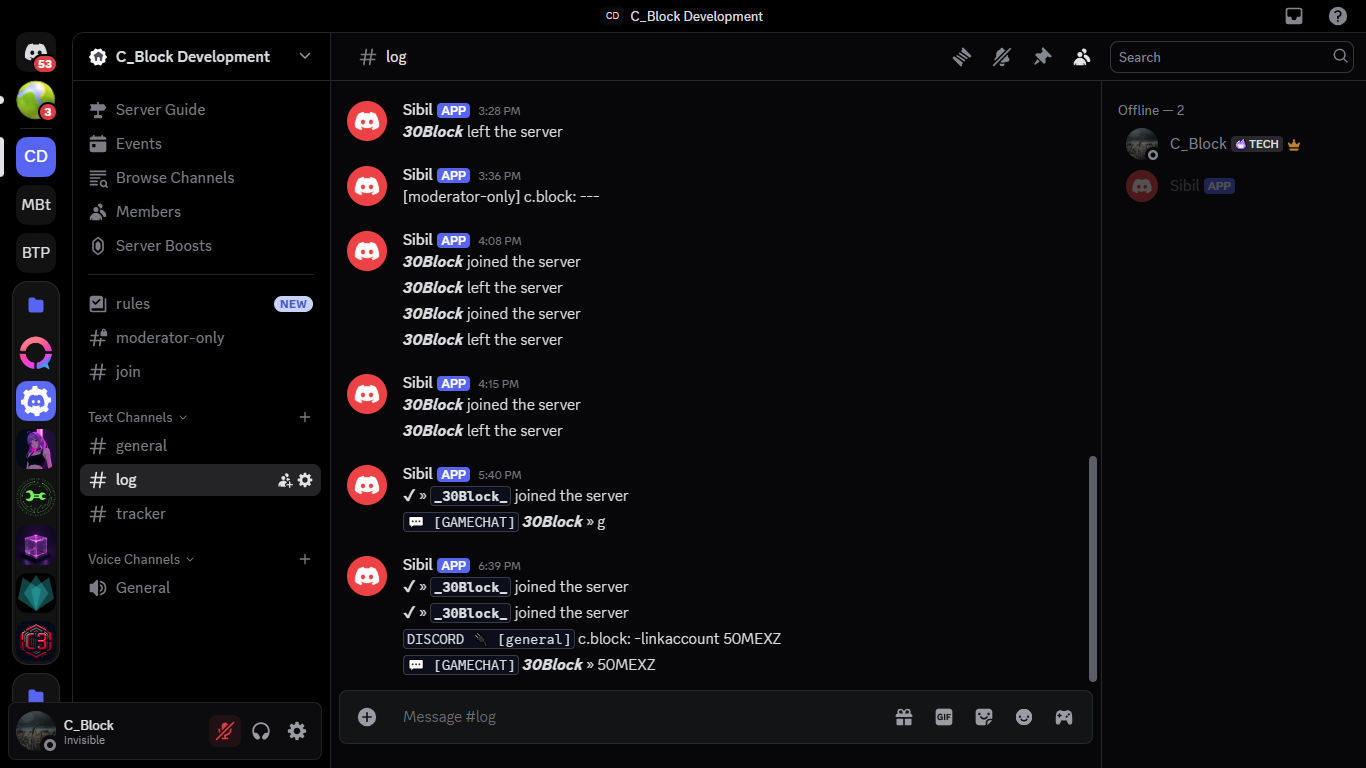
You can choose the channel as you like to place Discord and game logs there. Note that in this system, all logs are sent to both Discord and Minecraft.

Log channels CTDiscord

To activate this feature, simply enter the channel ID you want.

config.yml

log-channel: "0" # If you set this 0 its mean this feature is disable.

Custom Status/Activity

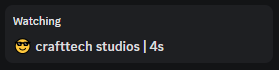
You can create and enjoy a fully customizable activity for your Discord bot, you can also set the bot's current status and use thousands of placeholders.

Custom Activity CTDiscord

To set and edit status and activity, simply review the following items in the config.yml file and configure it as desired.

config.yml

bot-status:
  activity: "😎 crafttech studios | %ctdiscord_uptime%" # you can use any placeholder
  status: online # online, dnd, idle, offline
  mode: watching # watching, playing, competing
  refresh-rate: 10 # in seconds (5-30), 🤣 if  you don't like your account you can set this to 1

Tracker System

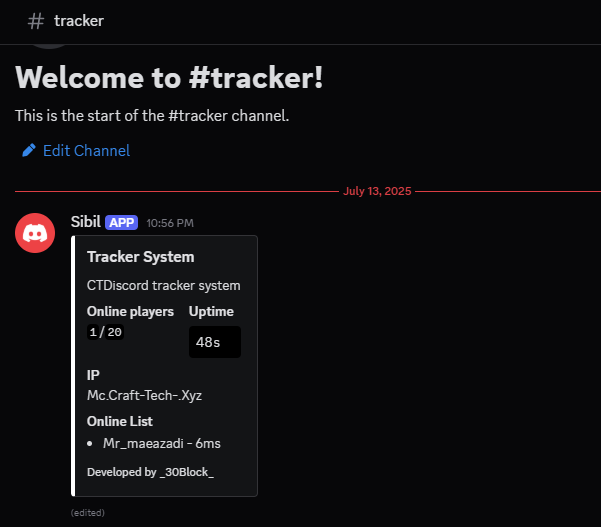
One of the unique features of this plugin is that it eliminates your need for coding and without having to write a single line of JavaScript, you can have a powerful tracker system on your server and instantly get informed about the ping status and online players, or even set up live playtime for players.

Tracker System CTDiscord

To configure this system and its settings, just review the lines below and update the following files and get the best results from your favorite system.

config.yml

tracker:
  channel: "0" # if you like enable this feature you can set this number to your channel id want send tracker embed
  embed: "tracker" # your tracker embed on embeds.json
embeds.json

"tracker": {
    "title": "Tracker System",
    "description": "CTDiscord tracker system",
    "color": "#FFA500",
    "fields": [
      {
        "name": "Online players",
        "value": "`%ctdiscord_onlineplayers%`/`%ctdiscord_maxplayers%`",
        "inline": true
      },
      {
        "name": "Uptime",
        "value": "```%ctdiscord_uptime%```",
        "inline": true
      },
      {
        "name": "IP",
        "value": "%player_first_join%",
        "inline": true
      },
      {
        "name": "Online List",
        "value": "%ctdiscord_onlinelist%",
        "inline": false
      }
    ],
    "footer": {
      "text": "Developed by _30Block_"
    }
  }

Account linking

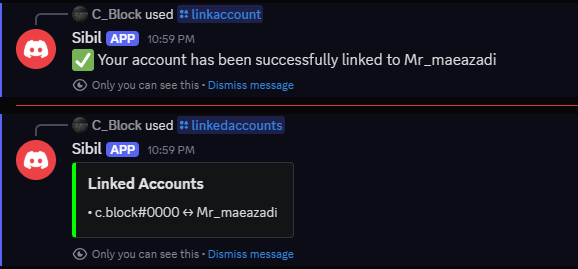
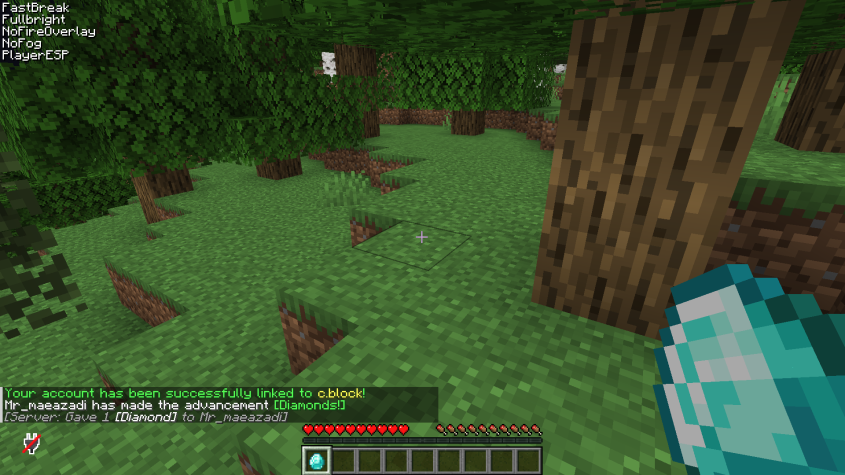
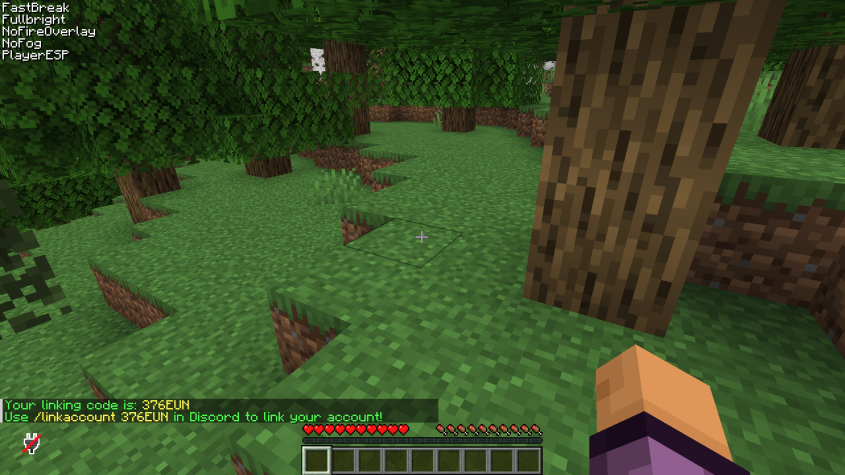
In the CTDiscord plugin, you can allow your users to link their accounts to their Discord and receive rewards, this can encourage players to do events and attract more users to your server. You can also use this system to hold raffles and draw among users whose accounts are linked.

Account Linking CTDiscord Account Linking CTDiscord Account Linking CTDiscord

You can make settings on this feature, such as setting rewards or even changing whether rewards are enabled or disabled for this system.

config.yml

linkaccount:
  enable-rewards: false
  rewards:
    - eco give %ctdiscord_playername% 6000
    - give %ctdiscord_playername% diamond 1

Slash Commands

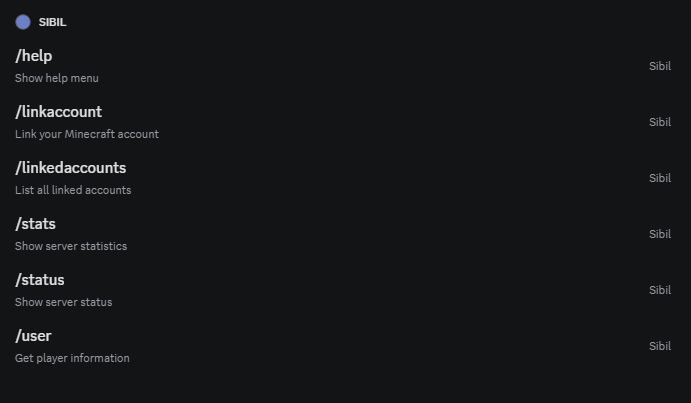
You can create a whole bunch of different commands using this plugin that work as SlashCommand in Discord and have the ability to use any type of Placeholder and exchange data! One of the attractive advantages of this plugin is creating custom commands, for example, you launched a Bedwars game mode and you want your users to see the list of top players in Discord with the command, you can implement this system and use it.

Slash Cmd's CTDiscord

You can design an embed as a response for each command and link it to your command so that if your command is executed, it will send the embed to the user! To do this, you need to make changes to two files: commands.yml and embeds.json.

commands.yml

#  ██████╗████████╗██████╗ ██╗███████╗ ██████╗ ██████╗ ██████╗ ██████╗
#  ██╔════╝╚══██╔══╝██╔══██╗██║██╔════╝██╔════╝██╔═══██╗██╔══██╗██╔══██╗
#  ██║        ██║   ██║  ██║██║███████╗██║     ██║   ██║██████╔╝██║  ██║
#  ██║        ██║   ██║  ██║██║╚════██║██║     ██║   ██║██╔══██╗██║  ██║
#  ╚██████╗   ██║   ██████╔╝██║███████║╚██████╗╚██████╔╝██║  ██║██████╔╝
#  ╚═════╝   ╚═╝   ╚═════╝ ╚═╝╚══════╝ ╚═════╝ ╚═════╝ ╚═╝  ╚═╝╚═════╝
#                  CTDiscord - Version 1.0 - _30Block_
#          You are now editing commands.yml file please becareful
#
# 📝 Plugin Document » https://ctdiscord.craft-tech.xyz
# ❓ Plugin Placeholders » https://ctdiscord.craft-tech.xyz/placeholders
# 🔥 You bought plugin from https://ctdiscord.craft-tech.xyz :) thankyou for supporting us.

# Bot commands Slash/Prefix
commands:
  status:
    description: "Show server status"
    embed: "status"
    options:
      - name: "detailed"
        type: "BOOLEAN"
        description: "Show detailed information"
        required: false

  user:
    description: "Get player information"
    embed: "user"
    options:
      - name: "username"
        type: "STRING"
        description: "Minecraft username"
        required: true
        auto-complete: true

  help:
    description: "Show help menu"
    embed: "help"
    guild-only: true

  stats:
    description: "Show server statistics"
    embed: "stats"
    permissions:
      - "MANAGE_SERVER"
WARNING: Make changes with caution and be careful. Before making any changes, make a backup of the original version to avoid any problems.

Embed Builder

In the CTDiscord plugin, you can create an infinite number of embeds and load and use them in various commands. The settings for these embeds are exactly the same as the settings you use when creating a real Discord bot. A completely JSON output that has a simple and understandable structure and does not require Javascript coding from scratch.

embeds.json

{
  "status": {
    "title": "✨ Server Status",
    "description": "The server is currently online with %bungee_total% players!",
    "color": "#00FF00",
    "fields": [
      {
        "name": "Online Players",
        "value": "%ctdiscord_onlineplayers% / %ctdiscord_maxplayers%",
        "inline": true
      },
      {
        "name": "Server IP",
        "value": "Mc.Craft-Tech.Xyz",
        "inline": true
      },
      {
        "name": "Uptime",
        "value": "%ctdiscord_uptime%",
        "inline": false
      }
    ],
    "footer": {
      "text": "Developed by _30Block_"
    }
  },
  "user": {
    "title": "😁 Player Info: %player_name%",
    "description": "Detailed information about %player_name%",
    "thumbnail": "%ctdiscord_mcprofile%",
    "color": "#FFA500",
    "fields": [
      {
        "name": "Rank",
        "value": "%vault_rank%",
        "inline": true
      },
      {
        "name": "Playtime",
        "value": "%playtime_hours% hours",
        "inline": true
      },
      {
        "name": "First Join",
        "value": "%player_first_join%",
        "inline": false
      },
      {
        "name": "Ping",
        "value": "%ctdiscord_ping% ms",
        "inline": true
      }
    ],
    "footer": {
      "text": "👁 Requested by %user_tag%"
    }
  },
  "help": {
    "title": "📌 Help Menu",
    "description": "Available commands for this server",
    "color": "#7289DA",
    "fields": [
      {
        "name": "/status",
        "value": "Show server status",
        "inline": true
      },
      {
        "name": "/user ",
        "value": "Show player information",
        "inline": true
      },
      {
        "name": "/help",
        "value": "Show this help menu",
        "inline": true
      }
    ]
  },
  "stats": {
    "title": "😁 Server Statistics",
    "description": "Detailed server statistics",
    "color": "#9B59B6",
    "fields": [
      {
        "name": "TPS",
        "value": "%ctdiscord_tps%",
        "inline": true
      },
      {
        "name": "MSPT",
        "value": "%ctdiscord_mspt%",
        "inline": true
      },
      {
        "name": "RAM Usage",
        "value": "%ctdiscord_memoryusage%",
        "inline": true
      }
    ],
    "footer": {
      "text": "Developed by _30Block_"
    }
  },
  "error": {
    "title": "❌ Error",
    "description": "An error occurred while processing your request",
    "color": "#FF0000",
    "fields": [
      {
        "name": "Possible Reasons",
        "value": "- Player not found\n- Invalid command\n- Missing permissions",
        "inline": false
      }
    ],
    "footer": {
      "text": "Developed by _30Block_"
    }
  },
  "tracker": {
    "title": "🔌 Tracker System",
    "description": "CTDiscord tracker system",
    "color": "#FFA500",
    "fields": [
      {
        "name": "Online players",
        "value": "`%ctdiscord_onlineplayers%`/`%ctdiscord_maxplayers%`",
        "inline": true
      },
      {
        "name": "Uptime",
        "value": "```%ctdiscord_uptime%```",
        "inline": true
      },
      {
        "name": "IP",
        "value": "Mc.Craft-Tech.Xyz",
        "inline": true
      },
      {
        "name": "Online List",
        "value": "%ctdiscord_onlinelist%",
        "inline": false
      }
    ],
    "footer": {
      "text": "Developed by _30Block_"
    }
  },

  "link_success": {
    "title": "✔ Account Linked",
    "description": "Your Discord account has been successfully linked to %ctdiscord_playername%",
    "color": "#00FF00",
    "footer": {
      "text": "Developed by _30Block_"
    }
  },
  "linked_accounts": {
    "title": "📝 Linked Accounts",
    "description": "List of all linked Discord and Minecraft accounts",
    "color": "#9B59B6",
    "fields": [],
    "footer": {
      "text": "Developed by _30Block_"
    }
  },
  "playtime": {
    "title": "Playtime for %user%",
    "description": "Total playtime: %ctdiscord_playtime_%user%%",
    "color": "#00FF00",
    "footer": {
      "text": "Developed by _30Block_"
    }
  }
}

Playtime system

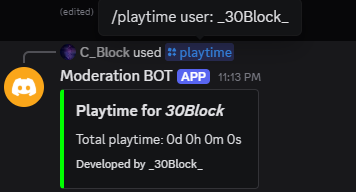
You can check your players playtime with this command in discord.

Slash Cmd's CTDiscord

You can deisgn the embed of playtime system on embeds.json

config.yml

# Playtime system
playtime-enabled:
  enabled: true
  embed: "playtime"
WARNING: Do not edit playtimes.yml file will server is running.

Placeholders

CTDiscord placeholders

Placeholder Description
%ctdiscord_tps% Show server tps
%ctdiscord_mspt% Show server mspt
%ctdiscord_onlineplayers% Show online players
%ctdiscord_maxplayers% Show maxplayers
%ctdiscord_ping% Show player ping, only use on commands for usernames
%ctdiscord_uptime% Show server uptime
%ctdiscord_clientid% Show bot clientid
%ctdiscord_serverid% Show GuildID
%ctdiscord_memoryusage% Show live server memory usage
%ctdiscord_freememory% Show live server free memory
%ctdiscord_maxmemory% Show max memory for this server
%ctdiscord_playername% Show playername
%ctdiscord_onlinelist% Show online list in server with ping
%ctdiscord_avatarurl% Minecraft avatar link
%ctdiscord_mcprofile% Minecraft avatar link
%ctdiscord_playtime_[playername]% Show specified player playtime

PlaceholderAPI placeholders

External placeholders on velocity version is unavailable

You need to install PlaceholderAPI on your server !

See placeholderapi placeholders on official page, or click here !

Troubleshooting

Check that:

  • Bot token is correct
  • Bot has proper permissions
  • Bot is online in your server

Verify that:

  • Channel ID is correct
  • Bot has Send Messages permission
  • Chat sync is enabled in config

Check that:

  • Commands is available and accessible
  • Command Structure is correct
  • The plugin whose commands are used must be available

Note:

  • if you are using Tracker system don't reload plugin, if you made any change restart your server to fix this issue